

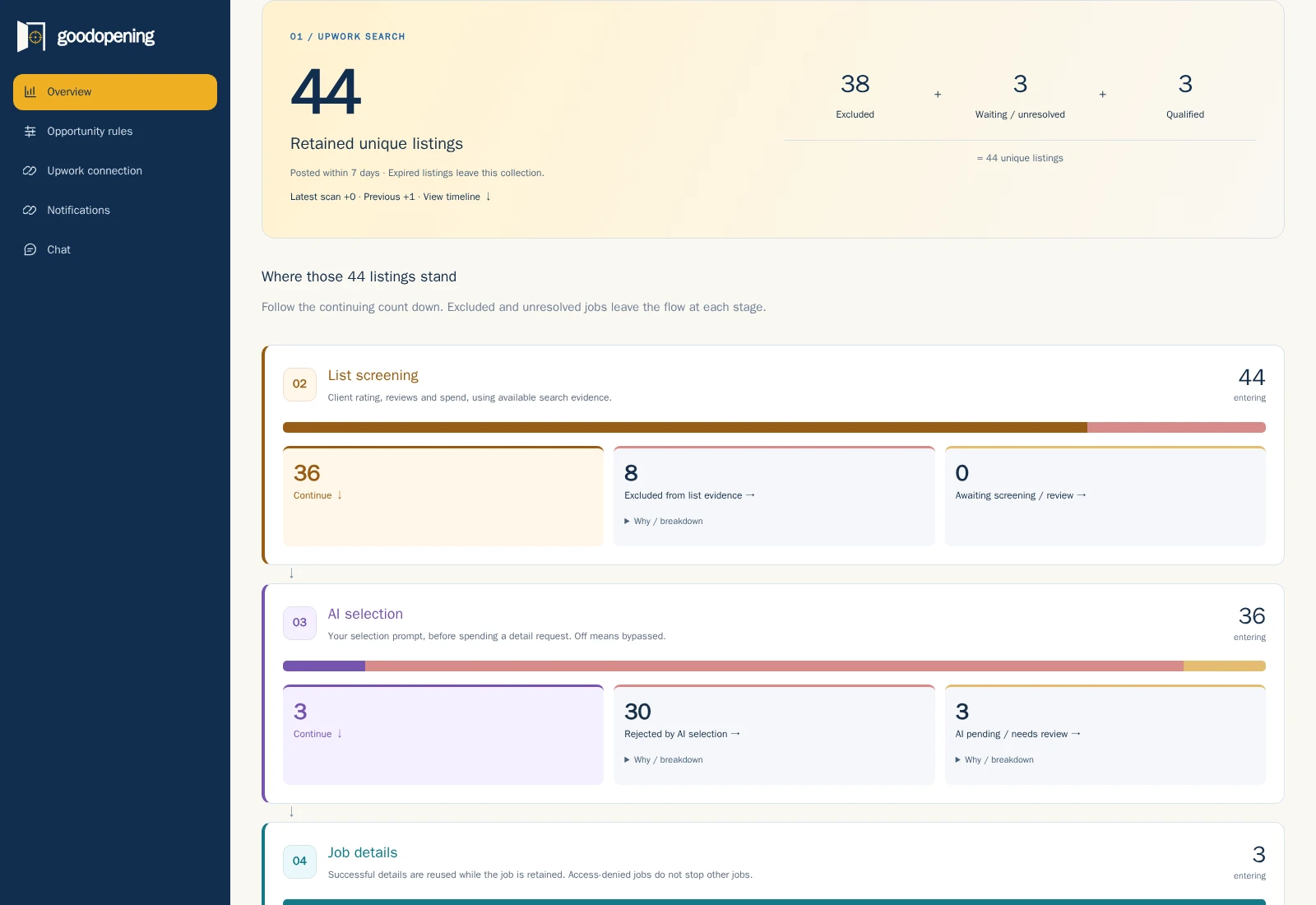
Follow the drop-off
Track jobs from discovery through list screening, AI selection and scoring.
YOUR UPWORK SEARCH. WORKING FOR YOU.
Finding the right work shouldn’t take hours of unpaid work.
Let Good Opening screen the noise, explain the decisions,
and bring the right opportunities to your attention.
Your criteria. A visible funnel. Relevant opportunities in Telegram.
Search on scheduleFresh searches every two hours
See each decisionFollow every screening decision
Tune your criteriaAdjust the rules as you learn
THE WORK BEFORE THE WORK
The scrolling. The weak budgets. The client checks. The same search, all over again.
A ChatGPT Upwork search can find listings. An ongoing search needs more: consistent standards, a record of what happened, and a clear way to improve the results.
01 SEE WHAT’S HAPPENING
No more wondering whether nothing fits or a filter is too strict. See where jobs leave your funnel—and the specific reason why.
Learn how to tune your alerts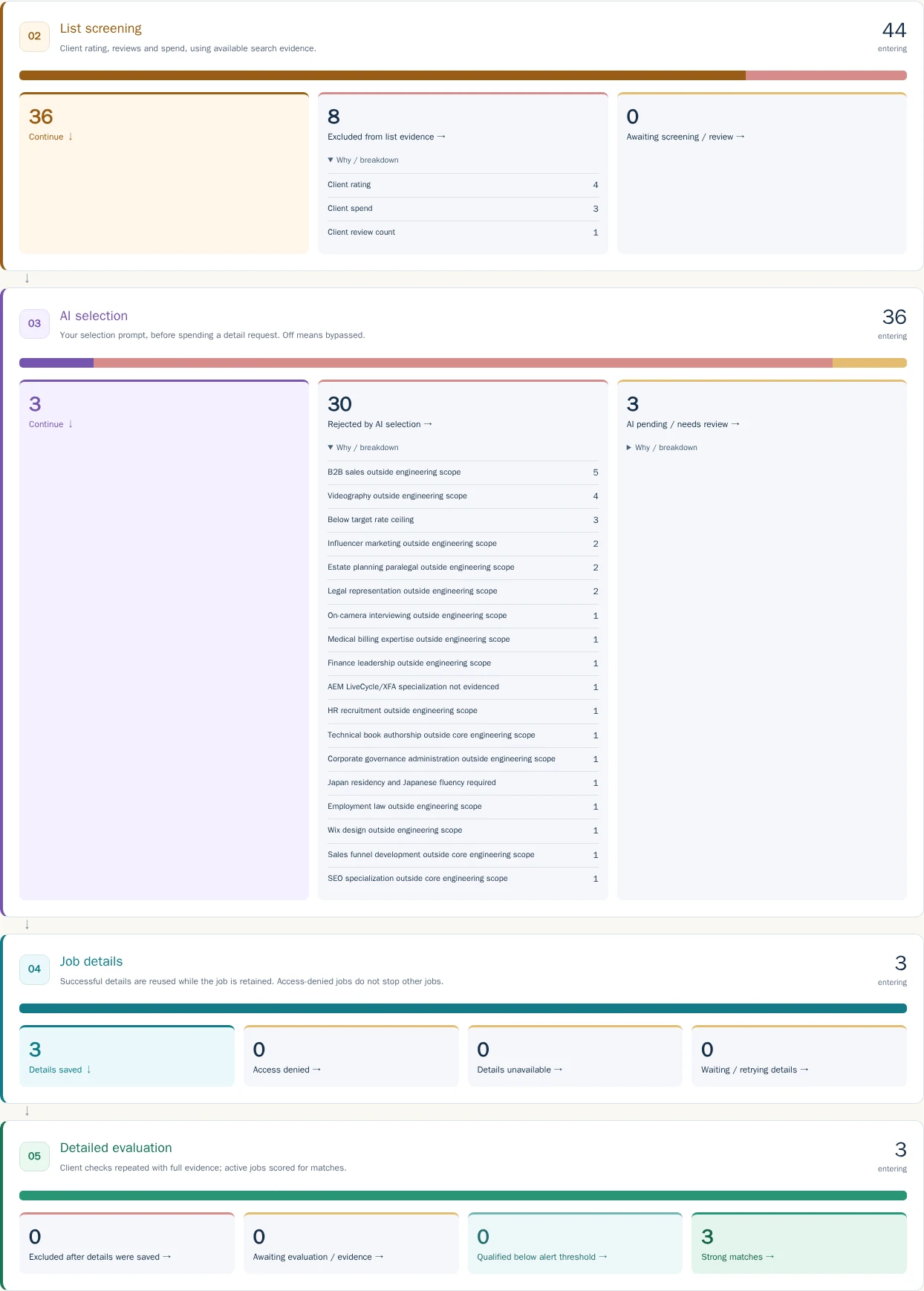
Track jobs from discovery through list screening, AI selection and scoring.
Inspect the criteria, saved evidence and AI explanation behind a decision.
Relax a local rule. Retained jobs are re-evaluated automatically, using saved evidence.
02 REFINE WITHOUT THE REPETITION
Lower a client threshold or sharpen your AI instructions. Your retained jobs are reconsidered automatically, with successful details and unchanged AI decisions reused where applicable.
Your standards, applied again

One real update, shown above.
Adjust the rules. See exactly what changed.
FROM REPEATED SEARCHES TO A REPEATABLE SYSTEM
Connect Upwork. Start with built-in defaults, then set your market, budget, client standards and the work you want.
Your preferences, in one placeMonitoring runs on a schedule. Your rules and AI instructions screen each opportunity, with decisions you can inspect.
A rolling seven-day collectionLet relevant opportunities reach you in Telegram. Use the funnel and your assistant to keep improving what makes the cut.
Spend attention where it mattersPUT IT TO WORK
The practical details of building a better opportunity pipeline.
First, check that Telegram is connected in Notifications and monitoring is enabled on the Upwork connection page. Then open your overview: alerts include qualified opportunities, with missing information shown for you to assess.
Follow the stage counts and exclusion reasons to see what’s holding jobs back. Relax the relevant client threshold or AI criteria—or ask Good Opening AI, “Why am I not getting alerts, and what should I change?”
See the funnel in actionChoose keywords, countries, budgets, proposal limits and client hiring history. Then fine-tune local screening, describe your ideal projects to the AI, and adjust scoring. Built-in defaults give you a starting point; the funnel shows you what to refine.
Local screening, AI prompt and scoring changes automatically update your retained collection. Saved evidence is reused, so you can refine your criteria without starting from scratch. Changing the upstream search—such as keywords or countries—starts a fresh collection for your new market.
Good Opening turns searching into an ongoing workflow: scheduled monitoring, configurable defaults, saved opportunities, tracked decisions, a visible screening funnel and Telegram alerts. You can see what your criteria are doing and improve them over time.
Yes. Drill into the relevant stage and job to inspect its screening outcome, the actual AI reason where applicable, and the saved evidence. You can also ask your assistant to help explain the decision.
Yes. Link Telegram in Notifications to receive opportunity alerts and talk to Good Opening AI. It uses the same workspace and preferences as the web app, with a separate conversation history.
YOUR NEXT OPPORTUNITY DESERVES A BETTER SYSTEM
Put your standards to work before you spend your time.
Create your workspace